Buying guide

How to Choose the Best Clinic Management System in Jordan

The best system for your clinic fits the work of clinicians, reception and accounting at a clear operating cost. This guide explains how to compare patient records, appointments, billing, permissions and support, and how to select a suitable ClinicsJo plan beyond a feature list.

8
areas for comparing systems

A practical comparison: what should you check in clinic software?

Compare the outcomes your team needs, then ask to see each one in the software. This table connects buying criteria to ClinicsJo examples and detailed feature guides.

Pre-subscription checklist — evaluate during your trial
CriterionWhat ClinicsJo providesHow to verify
Appointments and receptionAppointments, attendance and waiting statuses connected to patient records and team permissions.Book a training appointment, change its status as a receptionist and check the clinician’s view. Also test finding the correct record when names are similar.
Clinical records and specialty needsPatient records, visits, attachments and treatment plans, plus an interactive dental chart for dental practices.Document a training visit and retrieve its attachment from the same record. Ask to see available tools for your specialty and check that staff can retrieve the visit without re-entering data.
Billing and collectionsService invoices, payments, receipts and outstanding balances, with financial reports within authorized access.Use a training invoice of JOD 100 and a JOD 40 payment. Check that you can distinguish the invoice value, money collected and remaining balance, and retrieve the payment receipt.
Branches and staff permissionsRoles, permissions and branch access scopes, including financial access determined by the user’s permissions.Compare a branch-restricted staff account with the clinic owner’s account. Check report scope and visible branches, including whether changing a filter respects the staff member’s access.
Insurance and claimsInsurance records, claims, follow-up statuses and settlements according to clinic settings and enabled services.Follow a training claim from its invoice to claim status and settlement. Confirm the submission method for each insurer you work with; creating a claim does not establish insurer submission or acceptance.
Messages and patient remindersReminder and WhatsApp settings that depend on the connected channel, sending configuration and enabled features.Review timing, message content and delivery status using an authorized test number. Confirm channel costs, limits and activation requirements before relying on reminders.
Data migration and retrievalTools to import patient data and export data from supported sections, subject to account permissions.Test a sample before migration, checking patient names, phone numbers and duplicates. Confirm which records and attachments can be handed over, their formats and how to obtain them when ending a subscription.

Electronic invoicing, security and support: what should you verify?

The software includes Jordanian national e-invoicing connection settings. Activation requires clinic credentials, invoice configuration and acceptance validation. A connection does not establish official certification or acceptance of every invoice. Before subscribing, review privacy terms, account permissions and data retrieval options, and confirm training, migration and expected response times with support.

Three trial scenarios that reveal whether the software fits

Run the scenario closest to your practice with separate training accounts for clinicians, reception and management. Record what each person completes independently and what needs explanation or configuration before deciding.

One clinician and a reception team

Try one complete visit with training data: book, record arrival, open the record, then create an invoice and record a payment. Note repeated searches or data entry between screens and discuss unclear steps with reception. The decision criterion is completing the visit independently with the correct role.

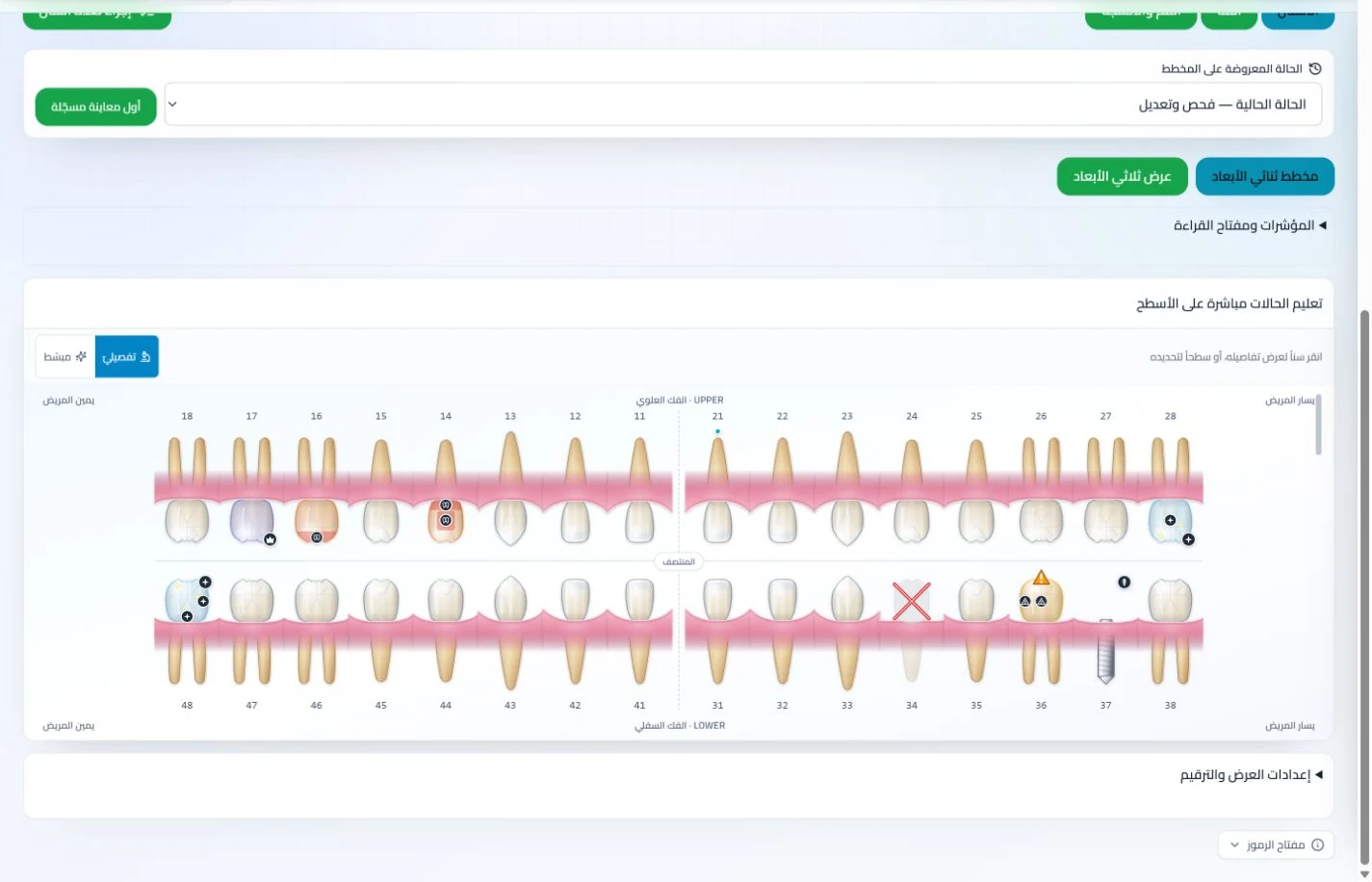
A dental practice with a multi-visit treatment plan

Choose a training case, select the tooth and procedure in the chart, then review the patient’s treatment plan, appointments and payments. Check how easily you can identify completed and remaining work. Compare it with your clinician’s actual workflow, beyond the appearance of the chart.

A practice with multiple clinicians or branches

Test an appointment for another clinician within permitted access, then a collection report for one branch. Review what staff and the owner can see and who may edit or cancel. A useful trial makes scope clear in screens and reports, without requiring a shared account as the team grows.

Appointments and attendance statuses in ClinicsJo clinic management software — synthetic training dataView screenshot ↗
Appointments with synthetic training data: identify the steps your reception team needs.
Dental chart and treatment planning in ClinicsJo clinic management software — synthetic training dataView screenshot ↗
Dental interface with synthetic training data: evaluate condition recording and treatment planning for your specialty.

Define clinic needs before comparing systems

A plan suitable for a single-doctor clinic may not fit a center with several clinicians and branches. Record your user and clinician counts, visit documentation and collection workflows, and expected messaging and file volumes. These requirements and team workflows make comparisons more useful.

Patient records and visits

Review the fields, attachments, prescriptions and treatment plans your team uses daily.

Scheduling and reception

Compare clinician calendars, online booking, attendance and the waiting queue.

Billing and collections

Check the invoices, payments, installments, insurance and reports you need.

Access and privacy

Review roles, access scope, privacy policy, sign-in options and data handover.

Setup and support

Identify communication channels, staff training, migration assistance and setup costs.

The right plan

Compare features, usage limits, add-ons and subscription terms before choosing.

Eight areas for comparing clinic management systems

Start with the work the clinic completes each day, then identify needs as the team grows. A feature count alone does not describe the experience: how information connects a visit, an appointment and an invoice, and how easily staff can review it, matters in daily use.

ClinicsJo provides patient records, visits, appointments and invoices, with additional modules enabled according to the subscription. A dental chart is available within its features; other specialties use general patient records, visits, notes and services.

  • Clinical documentation: the records, attachments and prescriptions your specialty needs.
  • Appointments: schedules, booking and attendance.
  • Finance: invoices, collections, balances and expenses.
  • Permissions: clinician, reception, accounting and branch access.
  • Communication: the channels, reminders and messages you need.
  • Operations: devices, connectivity and team setup.
  • Support and data: training, assistance, export and handover.
  • Cost: plans, add-ons, limits and subscription terms.

Calculate operating costs using the current plan

Start with the ClinicsJo plans and pricing page. Review clinician, user and branch allowances, included features, file and messaging limits, and any add-ons you need. Do not assume an advertised subscription includes every module or external channel cost.

Compare billing cycles, renewal and cancellation terms, and any trial or refund offer against the terms published at signup. If moving an archive or setting up several branches, define setup, training and data migration scope so each offer covers the same needs.

Plan support and data handover from the start

Identify who will train clinicians, reception and accounting, and who will contact support when needed. Agree on support channels, scope and setup timing, and start with the permissions, services and prices the clinic actually uses.

Review the privacy policy and record access scope, and ask about available export formats and handover steps. A migration plan should address clinical records, attachments and accounts, including responsibility for verifying transferred information.

The public profile is part of the clinic presence

A clinician and clinic profile on ClinicsJo can present specialty, services, location, contacts and published booking options. Complete details give visitors practical information for choosing how to contact the clinic.

Use the profile within your clinic channels and evaluate actual visits and inquiries. Search preparation supports content discovery, while indexing, ranking and AI recommendations are decided by each provider and do not assure a patient count.

Why doctors in Jordan choose ClinicsJo

Explore clinic workflows and public professional profiles in one platform.

1

Clinic work in one place

Records, appointments, invoices and additional modules to match team needs.

2

Arabic and English interface

Evaluate clinician and reception workflows in the language your team uses.

3

A subscription matched to needs

Choose from current plans and review their limits and add-ons before subscribing.

Topics covered

Patient records and visitsAppointments and bookingBilling and collectionsStaff permissionsPlan and add-on comparisonData migration planning

Frequently asked questions

What is the best clinic management system in Jordan?

The choice depends on specialty, team size, required features and cost. Compare the workflow from patient record and appointment through invoice and collection, then permissions, support and data handover. Evaluate ClinicsJo against these needs and the current plans.

How should I compare system costs?

Compare the same clinician, user and branch counts and features. Include setup, migration, messaging and required add-ons, and review billing cycles, renewal and cancellation terms. ClinicsJo’s plans and pricing page lists current options.

Is being built in Jordan enough to choose a system?

Fit depends on features, workflows, support and cost. Check the language, currency, invoicing and insurance your clinic needs, and compare offers against the same requirements regardless of the provider’s country.

Does a subscription guarantee first position on Google?

The public profile presents clinician and clinic information and can be prepared for search discovery. Indexing, ranking and visibility in AI answers are controlled by those systems; a subscription does not guarantee a position or a booking count.

What should I review before moving clinic data?

Define the records, attachments and accounts needed, their formats, entry and verification responsibilities, and access permissions. Agree on export, handover and support options before moving the complete archive.

Explore more of the system

General Practice Clinic Management Software in Jordan
General Practice
Dentistry Clinic Management Software in Jordan
Dentistry
Dermatology Clinic Management Software in Jordan
Dermatology
Ophthalmology Clinic Management Software in Jordan
Ophthalmology
ENT (Ear, Nose & Throat) Clinic Management Software in Jordan
ENT (Ear, Nose & Throat)
Cardiology Clinic Management Software in Jordan
Cardiology
Orthopedics Clinic Management Software in Jordan
Orthopedics
Pediatrics Clinic Management Software in Jordan
Pediatrics
Obstetrics & Gynecology Clinic Management Software in Jordan
Obstetrics & Gynecology
Urology Clinic Management Software in Jordan
Urology
Neurology Clinic Management Software in Jordan
Neurology
Psychiatry Clinic Management Software in Jordan
Psychiatry
Internal Medicine Clinic Management Software in Jordan
Internal Medicine
General Surgery Clinic Management Software in Jordan
General Surgery
Plastic & Reconstructive Surgery Clinic Management Software in Jordan
Plastic & Reconstructive Surgery
Endocrinology & Diabetes Clinic Management Software in Jordan
Endocrinology & Diabetes
Gastroenterology Clinic Management Software in Jordan
Gastroenterology
Pulmonology Clinic Management Software in Jordan
Pulmonology
Nephrology Clinic Management Software in Jordan
Nephrology
Rheumatology Clinic Management Software in Jordan
Rheumatology
Dietitian & Nutrition Clinic Management Software in Jordan
Dietitian & Nutrition
Physiotherapy Clinic Management Software in Jordan
Physiotherapy
Radiology Clinic Management Software in Jordan
Radiology
Oncology Clinic Management Software in Jordan
Oncology
Family Medicine Clinic Management Software in Jordan
Family Medicine
IVF & Fertility Clinic Management Software in Jordan
IVF & Fertility
Anesthesia & Intensive Care Clinic Management Software in Jordan
Anesthesia & Intensive Care
Pain Management Clinic Management Software in Jordan
Pain Management
Allergy & Immunology Clinic Management Software in Jordan
Allergy & Immunology
Emergency Medicine Clinic Management Software in Jordan
Emergency Medicine
Geriatric Medicine Clinic Management Software in Jordan
Geriatric Medicine
Nuclear Medicine Clinic Management Software in Jordan
Nuclear Medicine
Medical Genetics Clinic Management Software in Jordan
Medical Genetics
Psychology Clinic Management Software in Jordan
Psychology
Speech & Language Therapy Clinic Management Software in Jordan
Speech & Language Therapy
Occupational Therapy Clinic Management Software in Jordan
Occupational Therapy
Special Education Clinic Management Software in Jordan
Special Education
Palliative Care Clinic Management Software in Jordan
Palliative Care
Nursing Clinic Management Software in Jordan
Nursing
Pediatric Surgery Clinic Management Software in Jordan
Pediatric Surgery
Thoracic Surgery Clinic Management Software in Jordan
Thoracic Surgery
Optometry & Optics Clinic Management Software in Jordan
Optometry & Optics
Pathology Clinic Management Software in Jordan
Pathology
Community & Preventive Medicine Clinic Management Software in Jordan
Community & Preventive Medicine
Hyperbaric Oxygen Therapy Clinic Management Software in Jordan
Hyperbaric Oxygen Therapy
Alternative & Complementary Medicine Clinic Management Software in Jordan
Alternative & Complementary Medicine
Sociology & Social Work Clinic Management Software in Jordan
Sociology & Social Work
Move Patient Data From Paper and Excel to Clinic Software
Moving to digital records
Manage Multi-Doctor Clinics and Medical Centers in Jordan
Clinic team coordination
Clinic Software Demo Checklist
Before subscribing
Appointment Booking System for Clinics in Jordan
Appointments & booking
Electronic Medical Records for Clinics in Jordan
Patient files & EMR
Clinic Billing & Accounting Software in Jordan
Billing & accounting
WhatsApp Patient Appointment Reminders for Clinics
Reminders & fewer no-shows
Insurance Claims Management for Clinics in Jordan
Insurance & claims

Run your clinic and get found on Google

Review current plans and service limits, or book a practical demo before subscribing.