Clinic management software

Clinic Management Software in Jordan

Less time on scattered details. More attention to your practice.

Clinic management software in Jordan for appointments, patient records, invoices, reports and team permissions, with Arabic and English interfaces.

Arabic and English on desktop and mobile
● ● ●Inside ClinicsJo
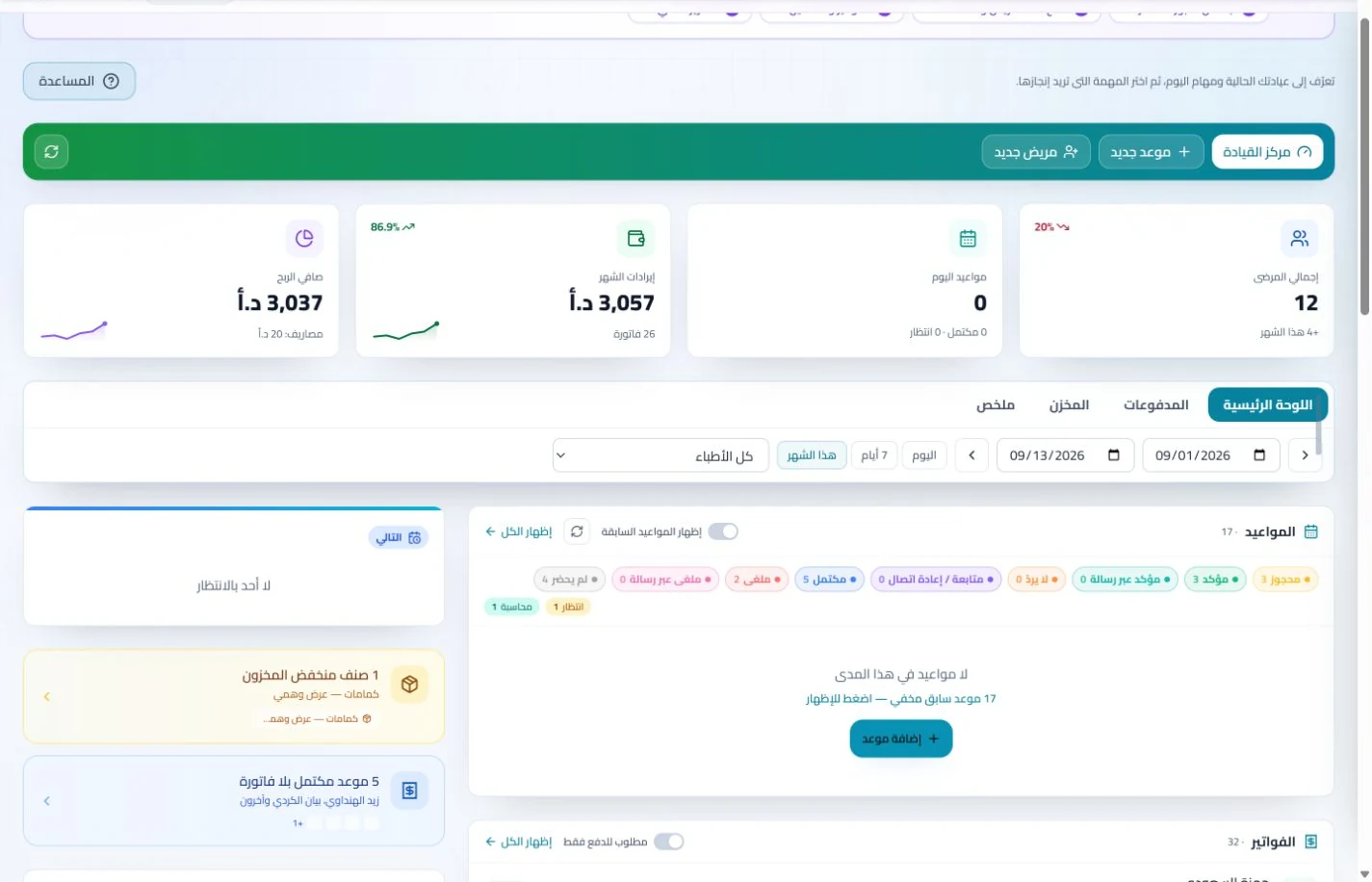
Clinic dashboard in ClinicsJo clinic management software — synthetic training dataView screenshot ↗
Organized appointmentsRetrievable recordsService and payment follow-upPermission-based access

Daily clinic operations

Appointments, records and billing in one system

Connected steps: appointment, visit, invoice and follow-up.

One team schedule

Booking, attendance and waiting with clear statuses.

Every visit in one record

Retrieve notes, attachments and treatment plans.

Easier payment follow-up

Invoices, payments and balances together.

A team with clear roles

Permissions and tasks matched to each role.

Choosing clinic management software

How do you choose the best clinic management software in Jordan for your practice?

Start with your clinic day: patient reception, visit documentation, billing and team follow-up. ClinicsJo combines these workflows with public clinician and clinic profiles in Arabic and English. Evaluate the fit during the free 7-day trial.

Appointments and reception

Try scheduling, changing appointment status and finding a patient. Check that reception and clinicians see what their roles permit.

Clinical records and visits

Use training data to try a visit, attachment and treatment plan. Evaluate tools your specialty needs, such as the dental chart, rather than feature counts alone.

Invoices, payments and reports

Check invoice totals, payments and outstanding balances, and how staff select report periods and branches within their permissions.

Phone, tablet and desktop

Open the system on your clinic’s actual devices. Try reading records, Arabic data entry and appointment follow-up with a suitable service connection.

Subscription and included features

Compare clinicians, branches, users, limits and enabled features in the current plan. Review the published price before subscribing; plans depend on the available offer.

Public profile and patient discovery

Check how the clinician’s name, specialty, services, practice location and contacts appear. Accurate public information helps patients and search engines understand the profile; it does not guarantee bookings or a search position.

Clinic management and a platform subscription: what is the difference?

Public profiles introduce patients to clinicians, clinics and their published information. Management software supports internal appointments, patient records, invoices and permissions. The current plan determines your account’s access. Review plans, register, or explore systems by specialty before deciding.

Explore clinic management tools in detail

Review each tool’s workflow and setup requirements, then test what suits your practice during the trial.

Systems by specialty

Explore clinic management by specialty

Choose your specialty and see how the software supports your clinic day.

47 specialties

General Practice clinic system

A clear record for varied visits

Explore the system →

Dentistry clinic system

Treatment across several visits

Explore the system →

Dermatology clinic system

Dermatology reviews and repeat sessions

Explore the system →

Ophthalmology clinic system

Organizing eye assessments and reviews

Explore the system →

ENT (Ear, Nose & Throat) clinic system

Consultations, procedures and reviews

Explore the system →

Cardiology clinic system

A clear sequence of cardiology reviews

Explore the system →

Orthopedics clinic system

From assessment to mobility review

Explore the system →

Pediatrics clinic system

An understandable history of child visits

Explore the system →

Obstetrics & Gynecology clinic system

Keeping recurring reviews connected

Explore the system →

Urology clinic system

Organizing investigations and follow-up

Explore the system →

Neurology clinic system

An accessible history of neurology visits

Explore the system →

Psychiatry clinic system

Regular sessions and controlled access

Explore the system →

Internal Medicine clinic system

Following several concerns in one record

Explore the system →

General Surgery clinic system

Organizing the patient journey around a procedure

Explore the system →

Plastic & Reconstructive Surgery clinic system

Documented consultations and reviews

Explore the system →

Endocrinology & Diabetes clinic system

Regular follow-up with organized reports

Explore the system →

Gastroenterology clinic system

Connected consultations and procedure reports

Explore the system →

Pulmonology clinic system

Appointments and respiratory reports

Explore the system →

Nephrology clinic system

Records for repeat reviews and results

Explore the system →

Rheumatology clinic system

Long-term follow-up without scattered files

Explore the system →

Dietitian & Nutrition clinic system

Follow-up sessions with documented goals

Explore the system →

Physiotherapy clinic system

A session sequence the team can follow

Explore the system →

Radiology clinic system

Organizing examination bookings and reports

Explore the system →

Oncology clinic system

Coordinating review visits and documents

Explore the system →

Family Medicine clinic system

An individual record for every family member

Explore the system →

IVF & Fertility clinic system

Coordinating multiple fertility reviews

Explore the system →

Anesthesia & Intensive Care clinic system

Organizing assessment consultations

Explore the system →

Pain Management clinic system

Assessment and procedure follow-up

Explore the system →

Allergy & Immunology clinic system

Organizing allergy reports and reviews

Explore the system →

Emergency Medicine clinic system

Organizing urgent outpatient services

Explore the system →

Geriatric Medicine clinic system

Organized follow-up for older adults

Explore the system →

Nuclear Medicine clinic system

Bookings and reports for outpatient services

Explore the system →

Medical Genetics clinic system

Consultations and reports that need context

Explore the system →

Psychology clinic system

Dedicated session time and professional records

Explore the system →

Speech & Language Therapy clinic system

Following speech and language sessions

Explore the system →

Occupational Therapy clinic system

Documented sessions around client needs

Explore the system →

Special Education clinic system

Appointments and individual follow-up notes

Explore the system →

Palliative Care clinic system

Coordinating follow-up and documents

Explore the system →

Nursing clinic system

Scheduling nursing services and reviews

Explore the system →

Pediatric Surgery clinic system

Children’s surgical consultations and reviews

Explore the system →

Thoracic Surgery clinic system

Consultation reports and surgical reviews

Explore the system →

Optometry & Optics clinic system

Organizing eye tests, visits and services

Explore the system →

Pathology clinic system

Organizing consultations and attached reports

Explore the system →

Community & Preventive Medicine clinic system

Organizing preventive consultations

Explore the system →

Hyperbaric Oxygen Therapy clinic system

Coordinating successive sessions

Explore the system →

Alternative & Complementary Medicine clinic system

Managing appointments and professional records

Explore the system →

Sociology & Social Work clinic system

Organizing interviews and professional follow-up

Explore the system →

Daily workflow automation

Coordinate clinicians and reception

  • Update an appointment so reception can follow the next step.
  • Record a payment and the invoice balance updates.
  • Configure messaging for appointment reminders.
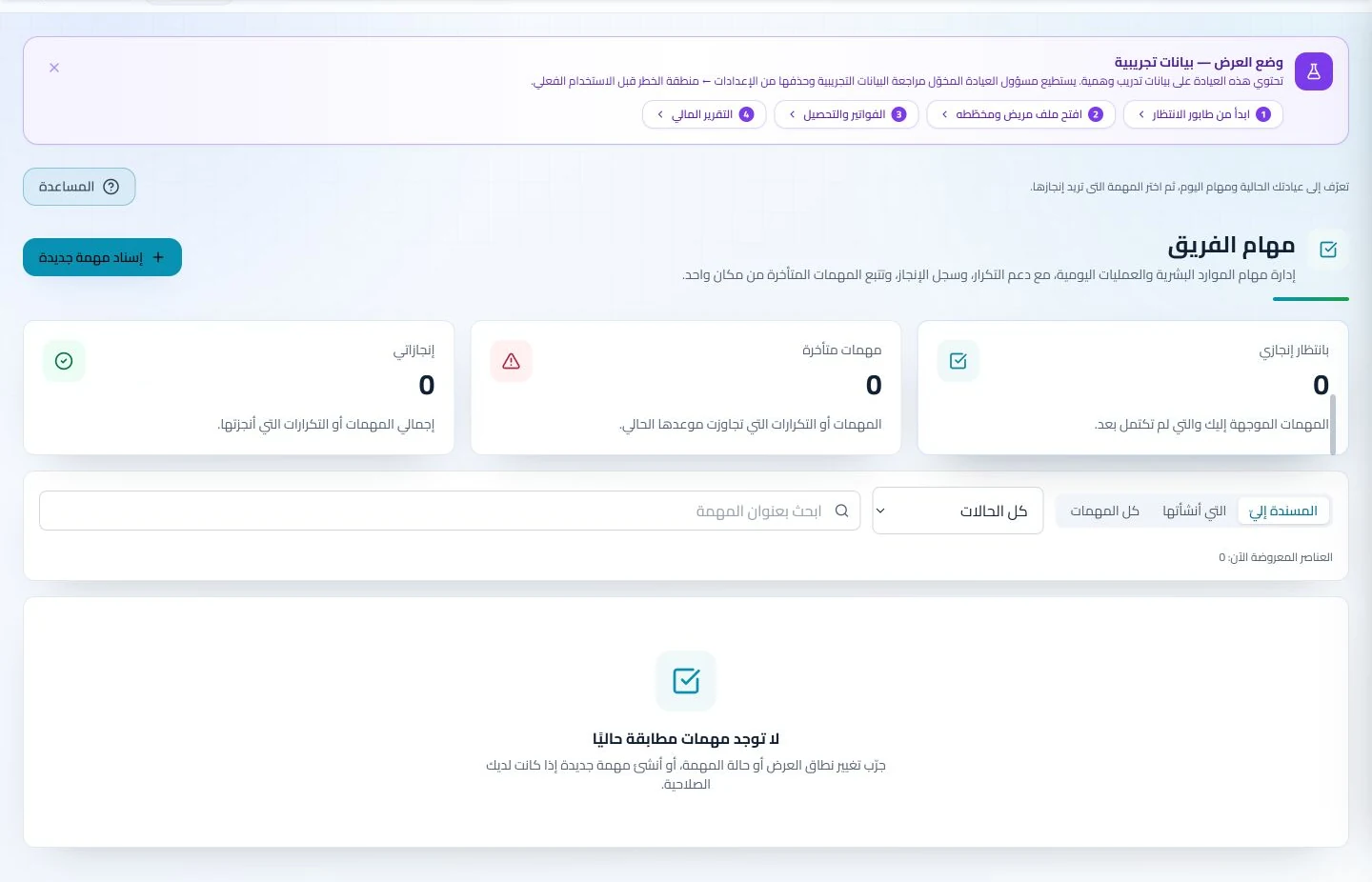
Team task follow-up in ClinicsJo clinic management software — synthetic training dataView screenshot ↗

Explore your clinic software

Clinic management features

Choose a section to learn more.

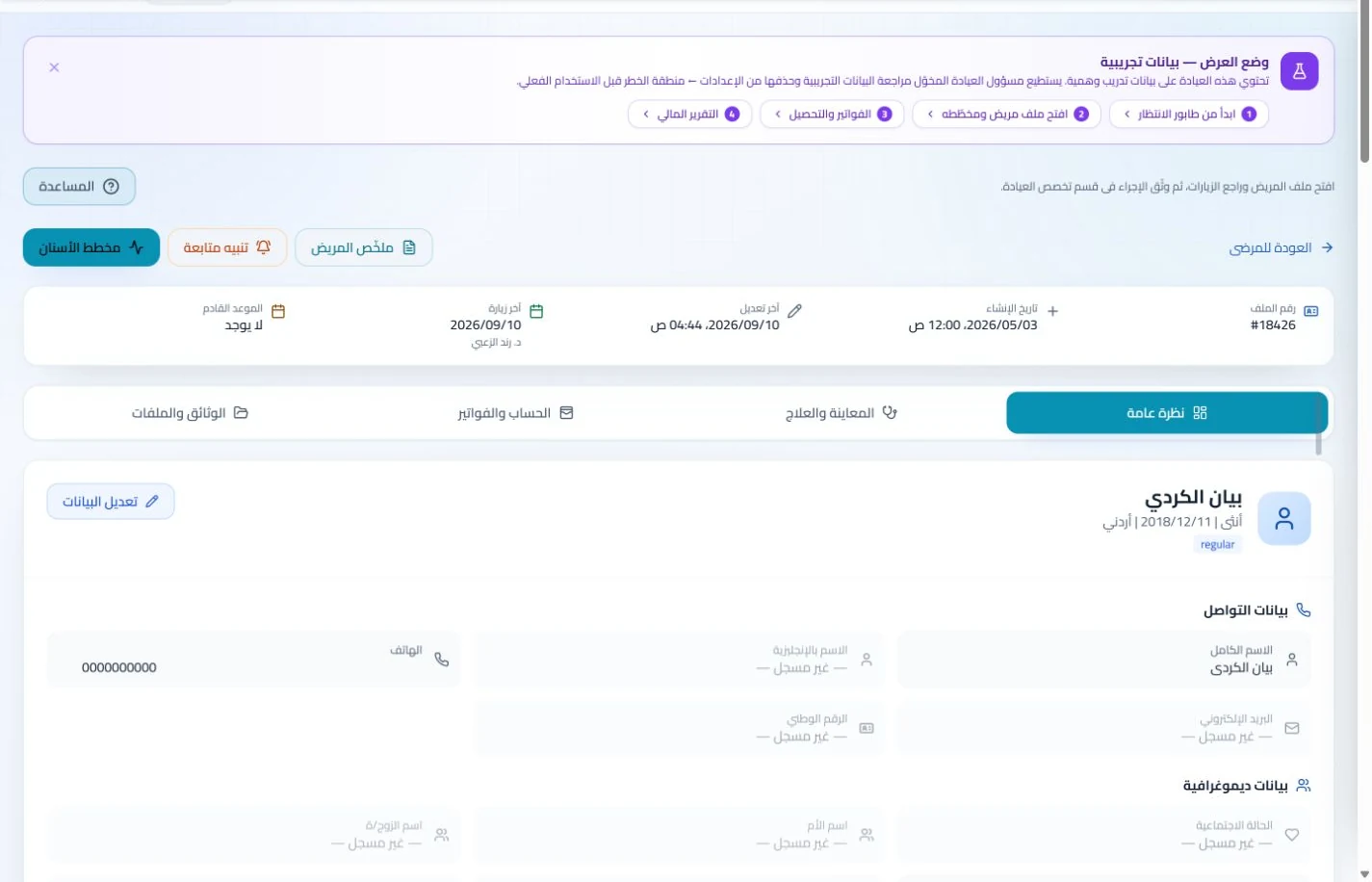
Patient records in ClinicsJo clinic management software — synthetic training dataView screenshot ↗

Patient files and clinical information

Find patient details and previous visits in their record.
  • Details and attachments
  • Visit history
  • Prescriptions and plans
Explore the details
  • Patient details, contacts, search and filters to find the correct record.
  • Visit history, clinical notes, images, files and attached reports.
  • Prescriptions, treatment plans and procedures in enabled modules.
  • Follow-up reviews and patient-linked services and invoices under user permissions.
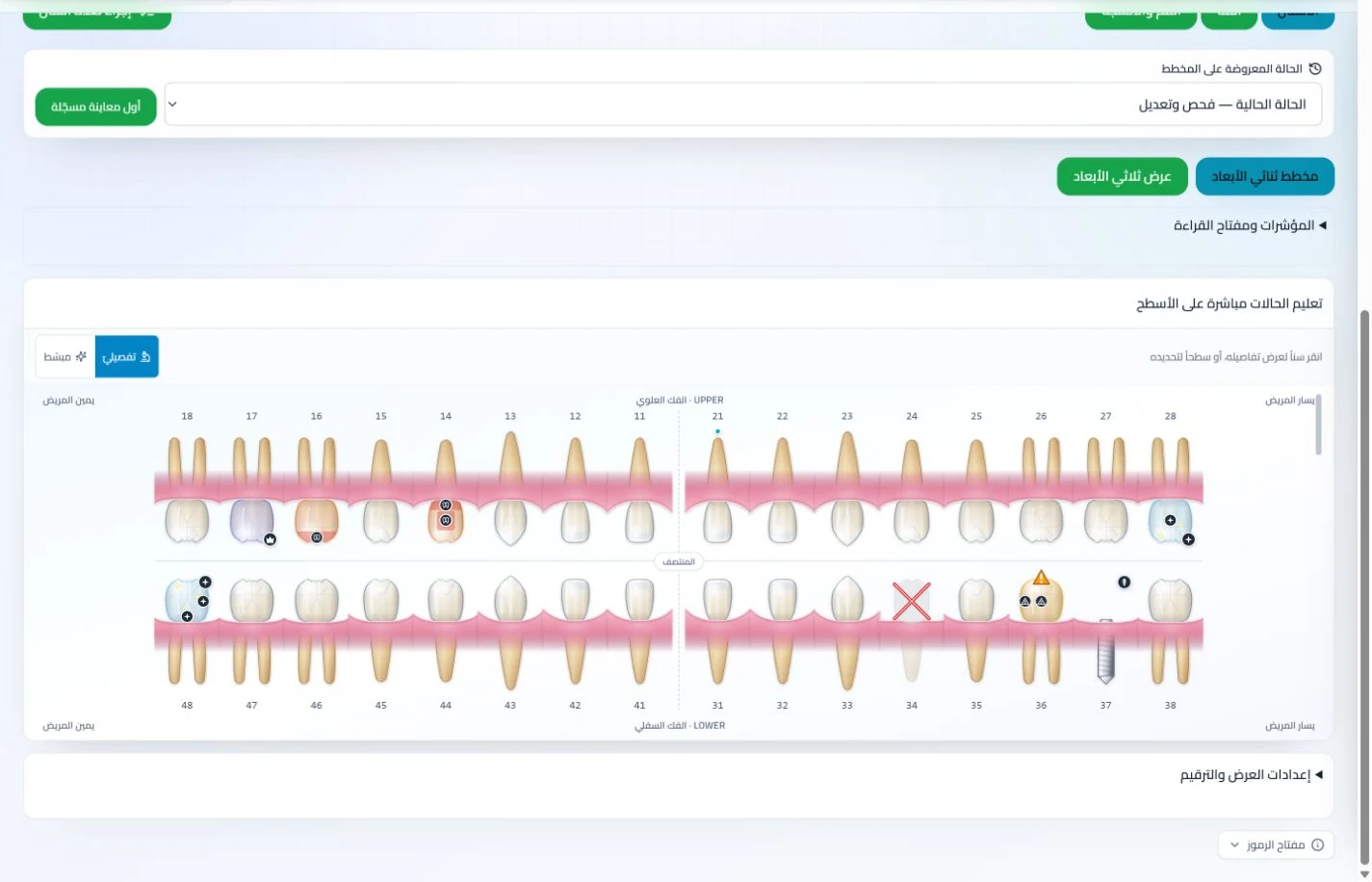
Dental chart in ClinicsJo clinic management software — synthetic training dataView screenshot ↗

Dental chart and treatment plans

Review tooth status and follow treatment across sessions.

  • Interactive chart
  • Procedure records
  • Linked sessions
Explore the details
  • Interactive dental chart to document teeth and procedures in the patient record.
  • Multi-session treatment plans and completed and remaining procedures.
  • Patient-linked images and attachments for subsequent reviews.
  • Visits, clinical notes and services in the general patient record, with the dental chart available in enabled features.
Appointments in ClinicsJo clinic management software — synthetic training dataView screenshot ↗

Appointments, bookings and waiting queue

A clear schedule for clinicians and reception.

  • Booking and changes
  • Attendance status
  • Waiting queue
Explore the details
  • Calendar and appointment list with clinician, service and status filters.
  • Create, update, cancel and record attendance under permissions.
  • Waiting queue to coordinate reception and clinicians.
  • Working hours, services and available online bookings.
Team tasks in ClinicsJo clinic management software — synthetic training dataView screenshot ↗

Patient reminders and communication

Follow team tasks and configure available appointment messaging.
  • Appointment reminders
  • Task follow-up
  • Configured channels
Explore the details
  • Appointment reminders and follow-up reviews in available screens.
  • Notifications and WhatsApp through configured channels and enabled features.
  • Messaging settings, campaigns and follow-up under staff permissions.
  • Patient feedback, reviews and available communication; delivery depends on configuration, connectivity and service availability.
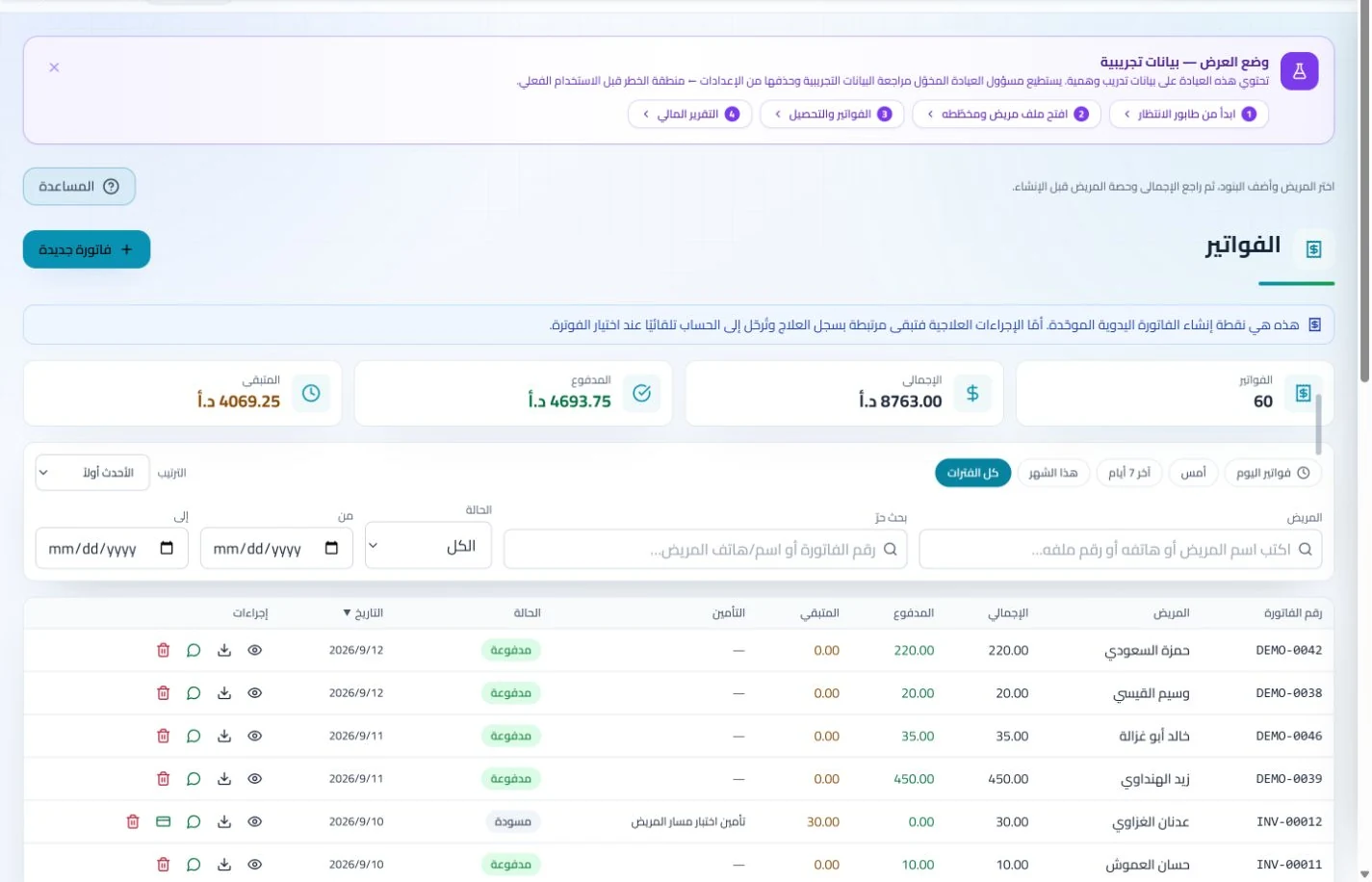
Invoices and collections in ClinicsJo clinic management software — synthetic training dataView screenshot ↗

Invoices, collections, balances and installments

See what each patient has paid and what remains due.
  • Invoices and receipts
  • Payments and installments
  • Outstanding balances
Explore the details
  • Service invoices, line details, recorded payments and receipts.
  • Outstanding balances, overdue debts and individual patient accounts.
  • Payment and installment plans when enabled, with payment follow-up.
  • Invoice settings, printing, document sharing and electronic invoicing when configured.
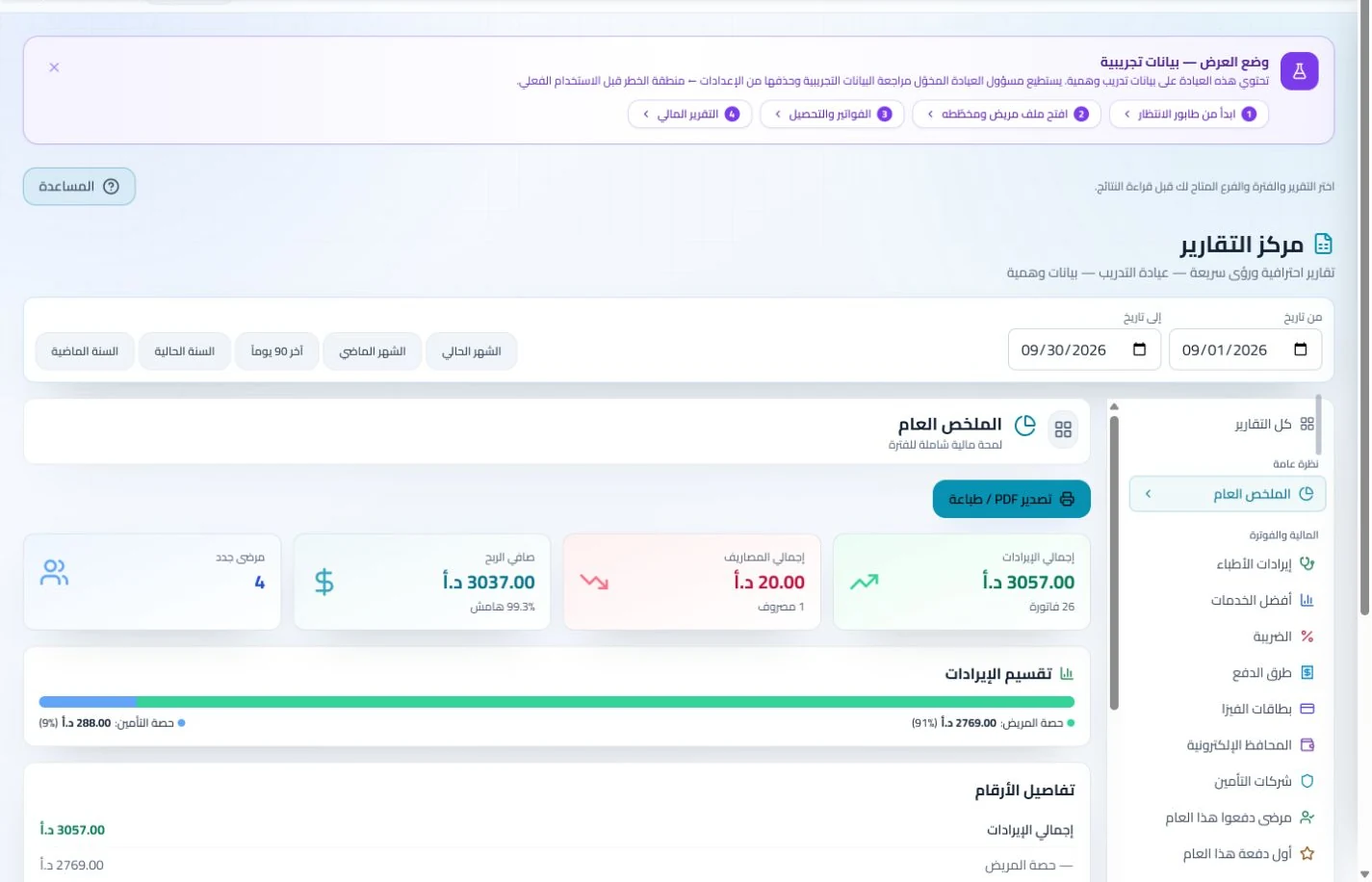
Accounting and reports in ClinicsJo clinic management software — synthetic training dataView screenshot ↗

Cash drawers, treasuries, expenses and financial reports

Review clinic revenue and expenses in organized reports.
  • Financial reports
  • Cash and treasuries
  • Expenses and period locks
Explore the details
  • Daily cash drawer, treasuries and collection or disbursement movements.
  • Record, categorize and review expenses under agreed permissions.
  • Daily and financial reports for revenue, collections and expenses, each with its own scope and dates.
  • Accounting checks and period locks; invoices and balances follow branch scope, while the central cash drawer is clinic-wide with appropriate permissions.
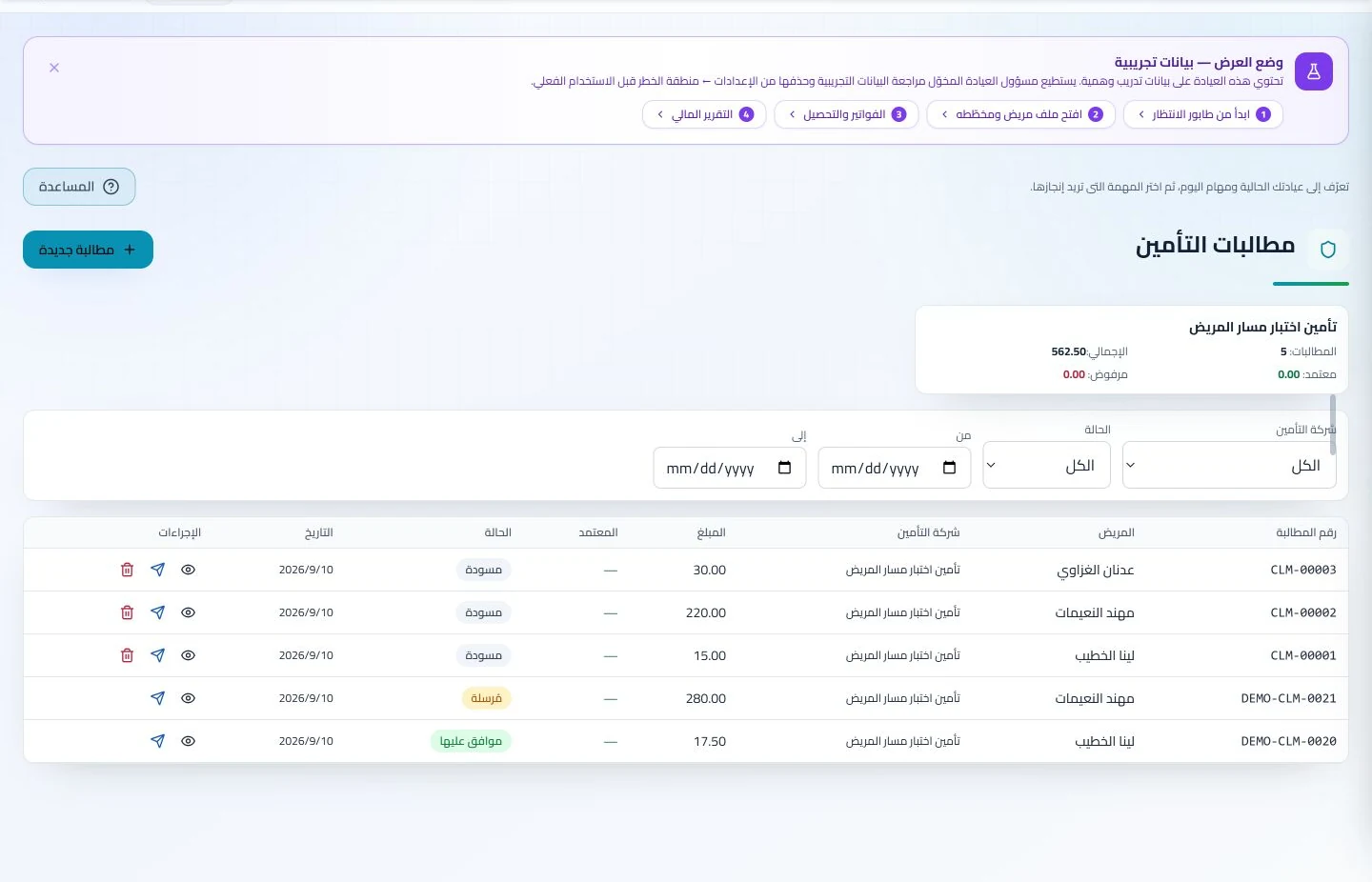
Insurance claims in ClinicsJo clinic management software — synthetic training dataView screenshot ↗

Medical insurance and claims

Follow claim amounts and status by insurance company.
  • Insurers
  • Claim status
  • Receivables and settlements
Explore the details
  • Insurance companies, services and available clinic insurance options.
  • Patient insurance information and service details according to clinic settings.
  • Create claims, review statuses and follow them grouped by insurer.
  • Track insurer receivables and record settlements.
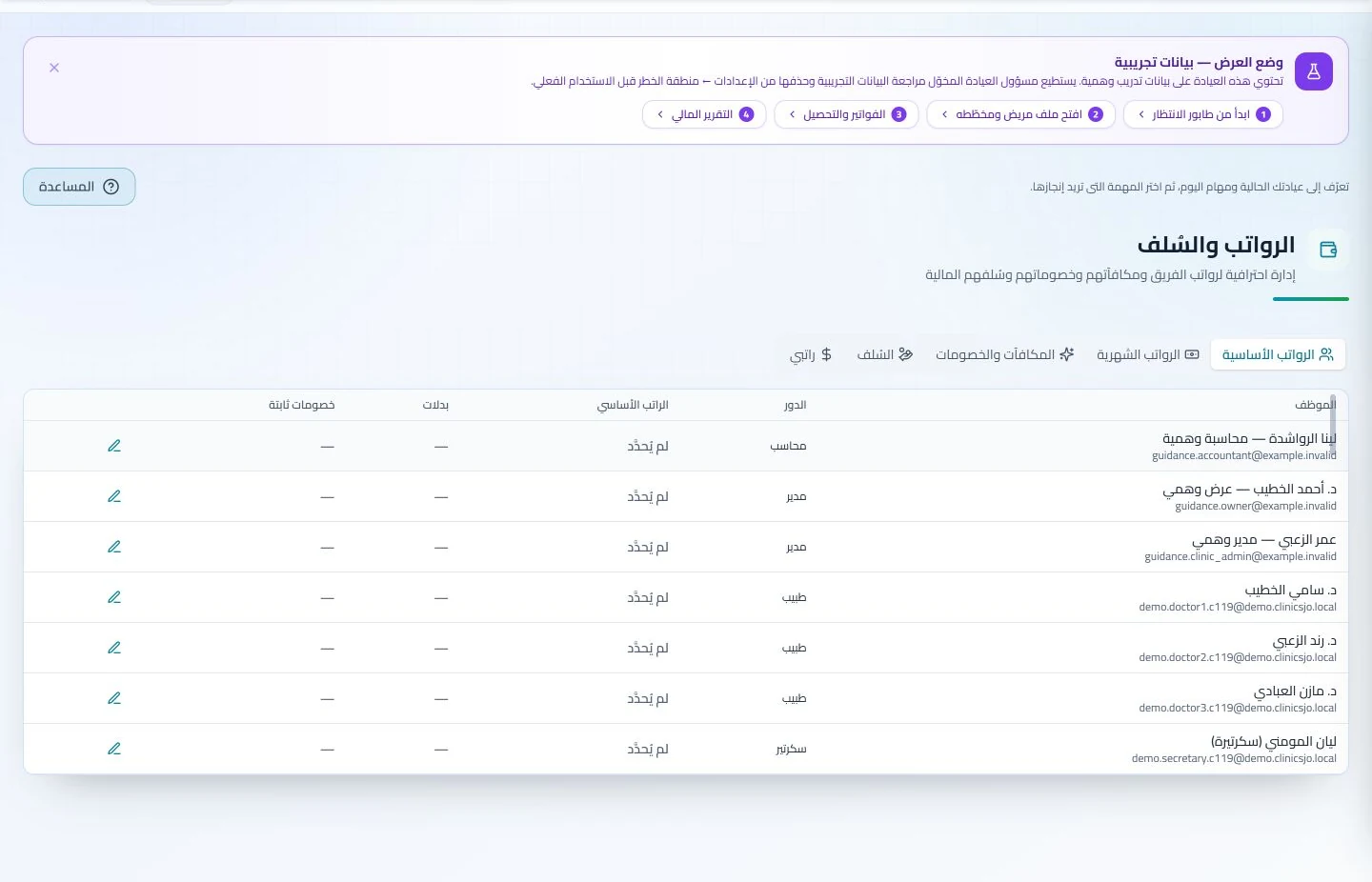
Human resources in ClinicsJo clinic management software — synthetic training dataView screenshot ↗

Human resources, attendance and payroll

Organize team administration from attendance to payroll.
  • Attendance and leave
  • Payroll and advances
  • Roles and commissions
Explore the details
  • Users, roles, permissions and clinic staff membership.
  • Attendance, departure and leave requests with follow-up.
  • Payroll, advances, commissions and rate settings under management permissions.
  • Staff analytics, tasks and team chat when enabled in the plan.
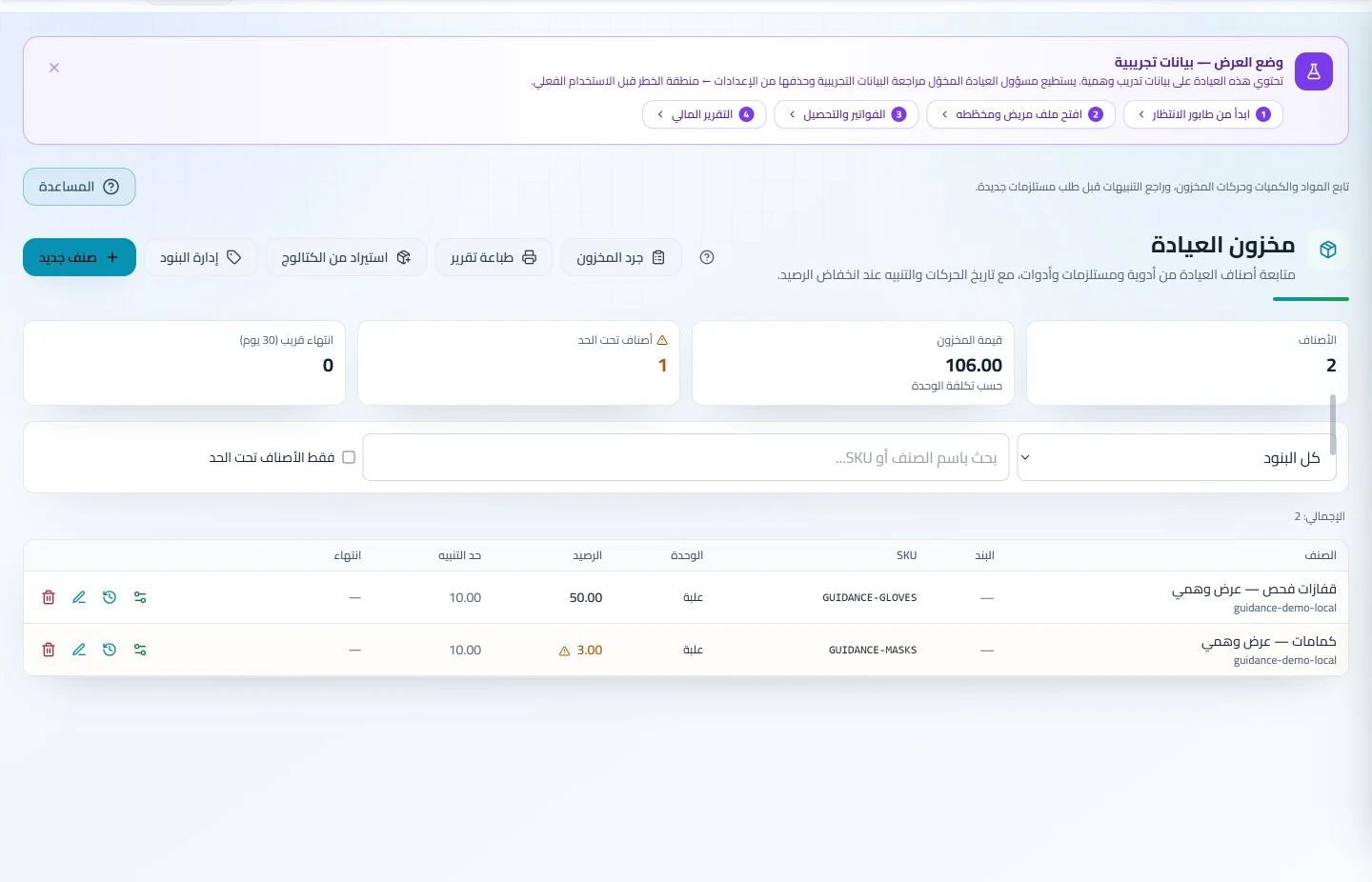
Inventory and storage in ClinicsJo clinic management software — synthetic training dataView screenshot ↗

Inventory, storage locations and stocktaking

Track materials, balances and stock movements.
  • Stock balances
  • Low-stock alerts
  • Stocktake and expiry
Explore the details
  • Items, quantities, units and reorder thresholds.
  • Low-stock status and recorded expiry dates.
  • Storage locations, stock movements, stocktakes and discrepancies.
  • Products, orders and sales through available sections; accurate balances depend on recorded movements and stocktakes.
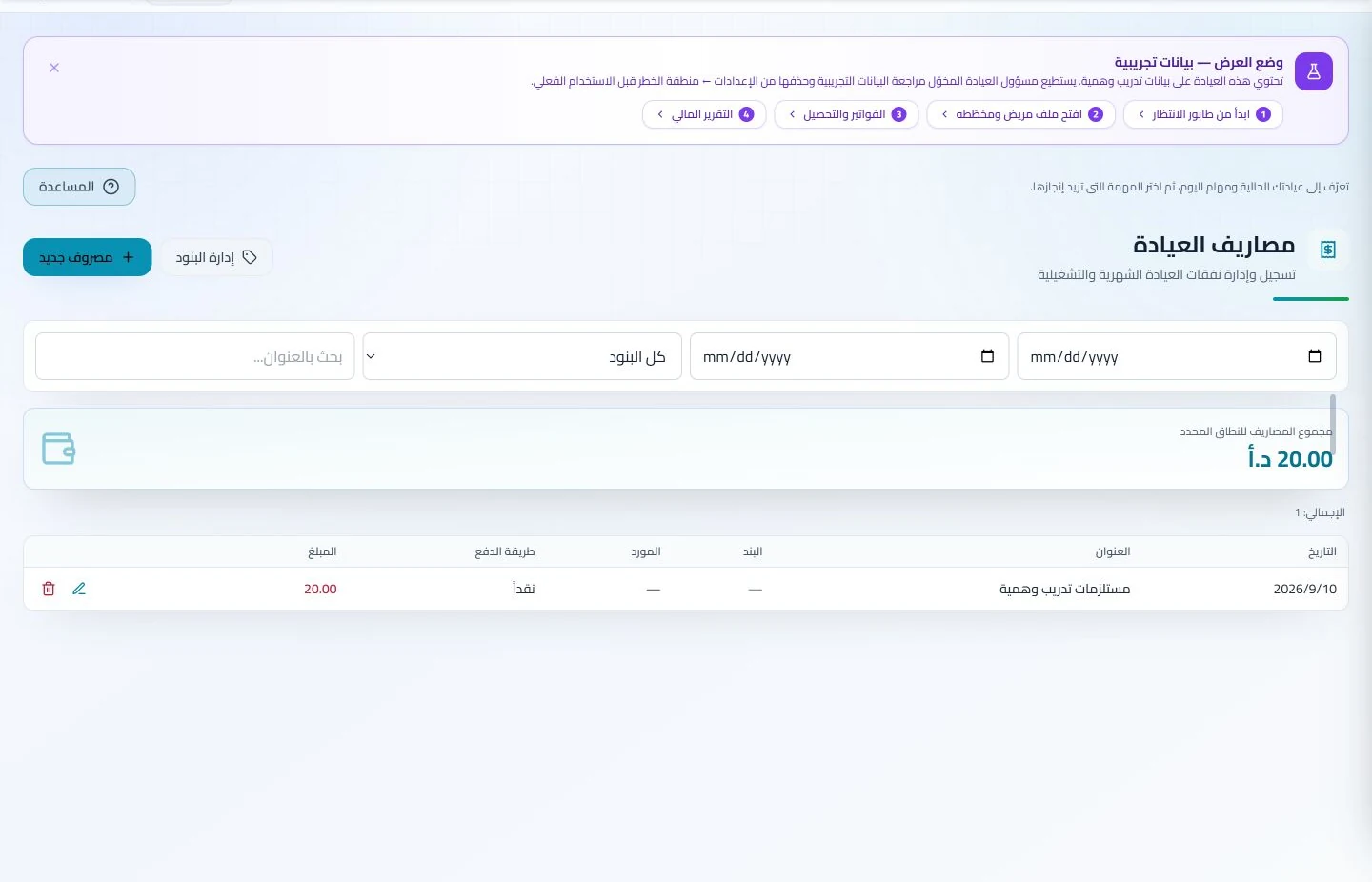
Clinic expenses in ClinicsJo clinic management software — synthetic training dataView screenshot ↗

Suppliers, laboratories and orders

Link materials to suppliers and follow lab orders and accounts.
  • Material sources
  • Lab orders
  • Expense follow-up
Explore the details
  • Add suppliers, link stock items and maintain available details.
  • Keep item sources retrievable for reordering.
  • Laboratories, work orders and statuses in dedicated sections.
  • Review laboratory accounts and outstanding balances.
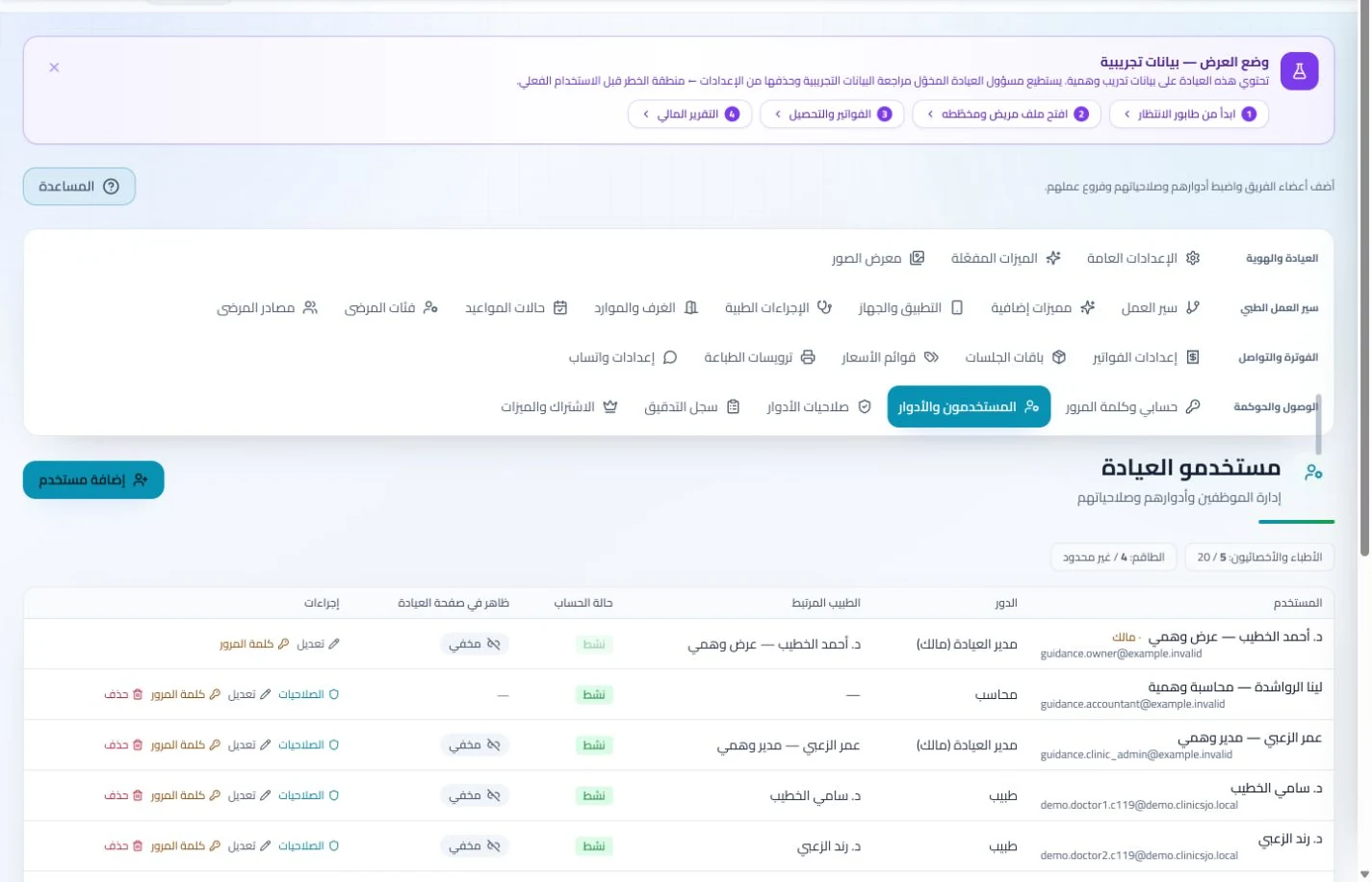
Branches and team in ClinicsJo clinic management software — synthetic training dataView screenshot ↗

Branches, services, rooms and team administration

Give each team member tools suited to their role.

  • Role permissions
  • Services and rooms
  • Branches and tasks
Explore the details
  • Clinic information, working hours, services and prices.
  • Available rooms and branches with user access scopes.
  • Team tasks, reports and audit records under permissions.
  • Optional clinic and subscription features with Arabic and English interfaces.
Clinic dashboard in ClinicsJo clinic management software — synthetic training dataView screenshot ↗

Public profiles and in-system help

Manage clinic operations and public presence together.

  • Overview dashboard
  • Public clinic profile
  • Guides and help
Explore the details
  • Clinician and clinic profiles, services, location and approved public contacts.
  • Bookings, reviews and public content within account options.
  • Help center, guides and tours tied to actual screens and permissions.
  • Public pages introducing the clinic, services and booking options.

See it before you start

Explore the system

Select a screenshot to enlarge it. Data shown is for demonstration.

View gallery — 14 screenshots
Appointments — ClinicsJo — synthetic training data

Appointments

Appointment views and statuses coordinate reception and clinicians.
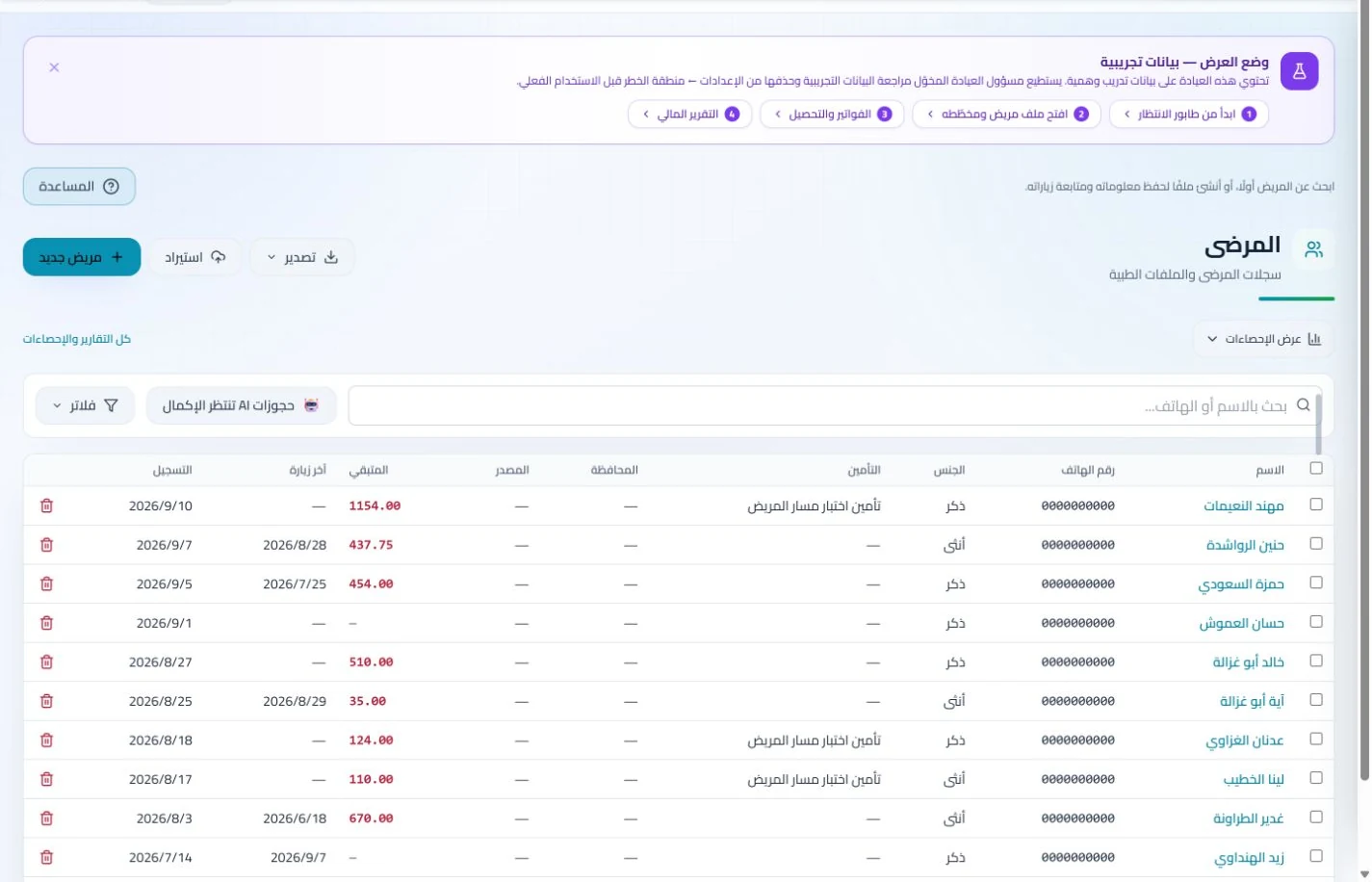
Patient records — ClinicsJo — synthetic training data

Patient records

Find the right record and follow visits through an organized list.

Invoices and collections — ClinicsJo — synthetic training data

Invoices and collections

Follow invoices and payment status under staff permissions.

Interactive dental chart — ClinicsJo — synthetic training data

Interactive dental chart

An example of a specialty module available for dental practices.

Inventory and storage — ClinicsJo — synthetic training data

Inventory and storage

Clinic stock balances, thresholds and item follow-up.

Insurance claims — ClinicsJo — synthetic training data

Insurance claims

Claims, insurers, amounts and follow-up statuses.

Clinic team and permissions — ClinicsJo — synthetic training data

Clinic team and permissions

Add staff and manage their roles and permissions.

Clinic dashboard — ClinicsJo — synthetic training data

Clinic dashboard

Daily appointments and clinic indicators.

Patient record — ClinicsJo — synthetic training data

Patient record

Patient details, visits and medical reports.
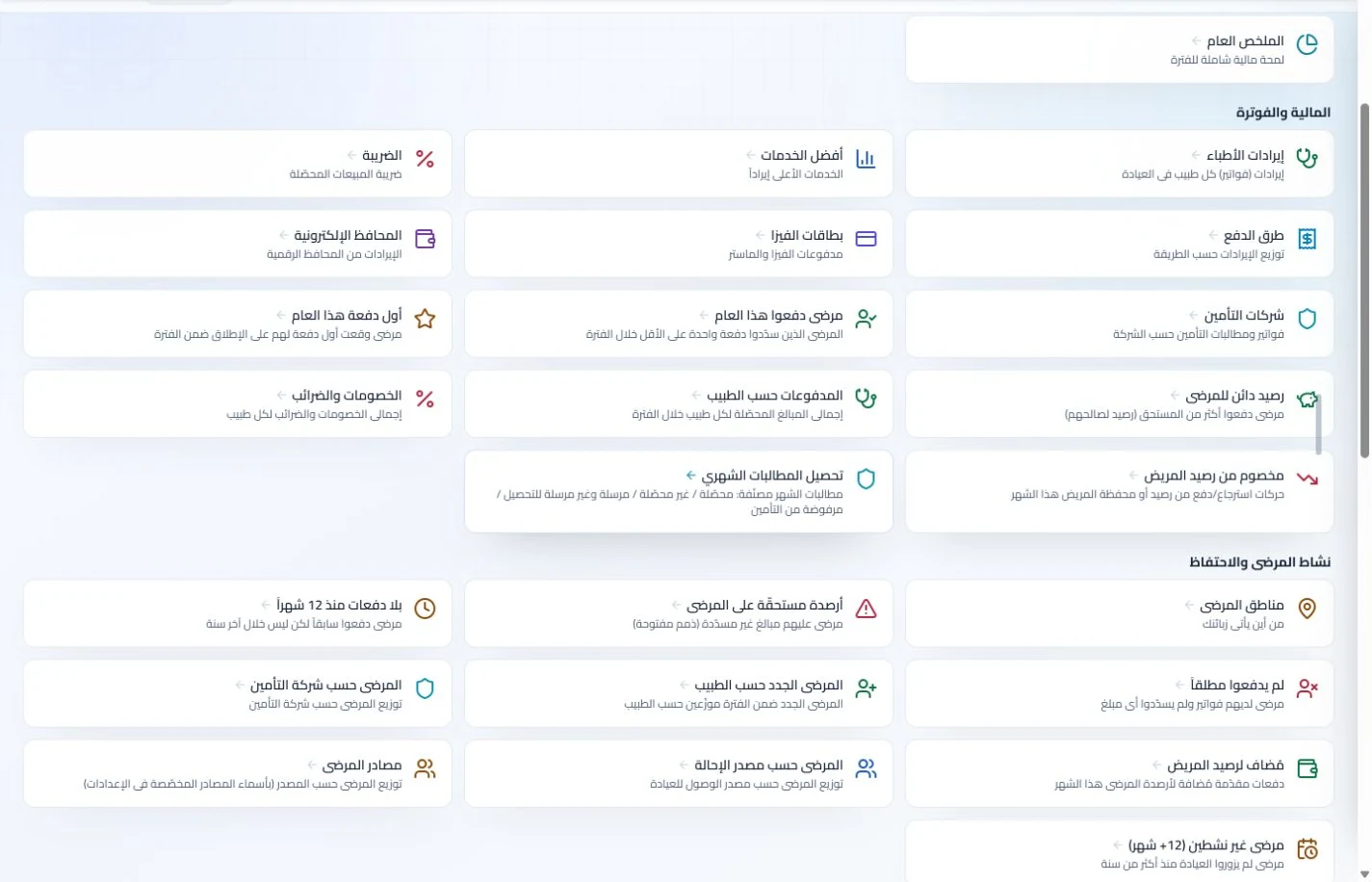
Report center — ClinicsJo — synthetic training data

Report center

Reports for reviewing clinic operations.

Financial summary — ClinicsJo — synthetic training data

Financial summary

Review revenue and expenses for a selected period.

Clinic expenses — ClinicsJo — synthetic training data

Clinic expenses

Record expenses and review their details.

Payroll and advances — ClinicsJo — synthetic training data

Payroll and advances

Set up staff salaries and follow advances.

Team tasks — ClinicsJo — synthetic training data

Team tasks

Assign tasks and follow their progress.

Who is ClinicsJo?

Clinic operations and a public presence, together

ClinicsJo combines clinic operations and public presence in Jordan: tools for your team and a profile introducing your services.

From organizing a visit to introducing your practice, explore the tools included in your account and plan.

Learn more about the platform →

Get started in a few steps

Try the system, then choose your plan

01

Create your account

Open registration and complete the information and steps requested by the platform.

02

Set up your clinic

Add clinic information, services and working hours, then review team access and available features.

03

Try it for 7 days

Try a complete scheduling, record and invoicing workflow and use the in-system help.

04

Choose a suitable plan

Compare included features, limits and current pricing on the plans page before subscribing.

Current clinic management subscriptions

Reach Plan

20 JODfor 30 days

Try free for 7 days

Included in your plan

  • Prescriptions
  • Staff, attendance, leave and payroll
  • Inventory
  • Multiple clinics
  • Clinic WhatsApp
  • Clinician profile
See all included features
  • Clinic profile
  • Appointments and bookings
  • Patient messaging
  • Review responses
  • Interactive dental chart
  • Treatment plans
  • Laboratories and orders
  • Medical insurance
  • Insurance claims
  • Expense management
  • Electronic invoices
  • Team chat
  • Article publishing within the plan
  • Advanced analytics and reports
  • Priority support

Current published prices and features. Review plan limits and configuration requirements before subscribing.

Know what your plan includes

A clinic-management subscription combines tools for patient records, appointments, billing and teamwork with a doctor and clinic profile on ClinicsJo. We prepare your profile for indexing and organize your specialty, services and location to support discovery in Google and AI-powered search. Tools and limits depend on your selected plan.

View current plans and prices

Questions before your trial

How do I choose the best clinic management app in Jordan?

Test your team’s phones, tablets and computers, including appointments, records, invoices and permissions. ClinicsJo offers browser access in Arabic and English, with features determined by the plan and settings. Try your actual workflow during the free trial and review current pricing and features before subscribing.

How do I choose the best clinic management software in Jordan?

Start with real workflows: book an appointment, retrieve a record, document a visit and issue an invoice. Compare Arabic usability, team access, included features and the final price. The best fit is the system your clinic needs and your team can use confidently.

Is the 7-day trial free?

Yes. Open registration, create your account and complete the steps to begin the trial. Evaluate scheduling, records and services available to your account, then review plans before subscribing.

What does a subscription include?

A clinic-management subscription combines tools for patient records, appointments, billing and teamwork with a doctor and clinic profile on ClinicsJo. We prepare your profile for indexing and organize your specialty, services and location to support discovery in Google and AI-powered search. Tools and limits depend on your selected plan.

Can appointment reminders be sent automatically?

Reminder settings are available when the service and sending channel are configured. An administrator selects settings and checks contacts and sending permissions. Adjust reminder settings to suit clinic appointments.

Can I use it on a phone or tablet?

Open the system in a phone, tablet or desktop browser. Layouts adapt to the screen; wide tables may need horizontal scrolling. Access to synchronized data requires a service connection.

Are these actual system screenshots?

Yes. These are actual ClinicsJo interfaces captured in a training instance with synthetic data. Your clinic may differ according to permissions, plan, enabled features and updates.

Guides to help you get started

Your next step

Try ClinicsJo in your practice

Start a free 7-day trial and see how the system fits your team’s needs.

Start your free 7-day trial